
NFHS Flag Football Rules for High School Coaches
The National Federation of State High School Associations publishes a flag football rules book that sets the national baseline: seven players per side, quarters, zone based field progression, four downs per series, try options after a touchdown, punt procedure, and penalty enforcement. Your state association decides which optional pieces of that baseline are in play for your season, and can add its own modifications on top.
So the split is simple. NFHS defines the structure. Your state association defines the version of that structure you actually coach and score. Everything below is labeled one way or the other, with the NFHS flag football rules page and flag football resources as the source for the baseline, and the NFHS rules book announcement for how the book is published.
The NFHS baseline at a glance
| Rule area | NFHS baseline | State adoption risk | Verify before your first game |
|---|---|---|---|
| Players | Seven per side | Low | Minimum players allowed to continue a game |
| Game structure | Quarters with intermissions and a halftime | Low | Quarter length, halftime length, timeout count |
| Field and zone to gain | Zone based progression rather than a fixed yardage first down | Medium | Field dimensions, hash marks, zone lines used locally |
| Downs | Four downs to reach the next zone | Low | How officials spot and confirm the zone |
| Passing and rushing | All players eligible, one forward pass per down, rushing governed by the rule set | Medium | Any state or league run play restrictions by zone |
| Tries | Multiple try distances and point values after a touchdown | High | Which try options are approved in your state |
| Kicking | Place kick try and field goal exist as options | High | Whether your state adopted kicking at all |
| Punts | Punt procedure defined in the rules book | High | Live return versus declared punt handling |
| Overtime | Equal possession procedure | High | Whether your state adopted it, and the format |
| Mercy rule | Point differential provision | High | Differential and clock effect used in your state |
| Penalties | Enforcement outcomes chosen by officials | Medium | Nothing to configure, but the scorer records what officials enforce |
Treat every row marked High state-adoption risk as unconfirmed until your state association, athletic director, or assigned officials confirm it in writing.
Field and zone-to-gain structure
NFHS flag football uses zone based progression instead of a single midfield line. The field is divided into zones, and each series has a zone to gain rather than a fixed ten yard chain measurement. Reaching the zone within the series earns a new series from the spot.
Exact field dimensions and hash mark use are among the items a state association can set, so confirm the field your program plays on rather than assuming a national number. For the full layout and how the zone to gain works in practice, read NFHS flag football field dimensions and zone to gain.
Downs and possession changes
Each series gives the offense four downs to reach its zone to gain. There is no automatic first down for crossing midfield the way many youth formats work. If the offense reaches the zone, it starts a new series. If it does not, the defense takes over at the spot.
Possession also changes on an interception, on a punt, and after a score. The scorer's job on every change of possession is to record where the ball is spotted so the down, zone, and target stay correct for the next series.
Passing, rushing, and flag rules
Under the NFHS baseline, all players are eligible receivers, only one forward pass is allowed per down, and the pass must be thrown from behind the neutral zone. A backward pass or fumble that hits the ground is dead at that spot rather than a live ball.
The flag pull ends the play, and the ball is dead where the flag comes off. If a belt falls off without a pull, the play ends on a legal one hand touch. Flag guarding by the runner is a foul.
Rushing is part of the high school game, but restrictions on run plays in specific zones are the kind of provision a state association or league can add. Confirm whether your state applies any run play limits before you plan your call sheet.
Touchdowns and tries
A touchdown is worth six points. After a touchdown the offense attempts a try, and NFHS defines more than one try distance and point value. A safety awards points to the defense and changes possession.
The place kick try and the field goal exist in the rules book as options rather than universal requirements, so their availability depends on your state association. Do not assume a kicking game is in play until your state confirms it. For how each try type is recorded and what it does to the score, read how scoring works in high school flag football.
Punts and kicking options
The NFHS rules book defines a punt procedure for high school flag football, including when a punt may be declared and how the ball is handled after the kick. This is one of the areas where state and local practice differs most, and California CIF is a clear example: its punt handling is not identical to the NFHS procedure, so a CIF game is scored differently from an NFHS game.
Penalty decisions the scorer must confirm
NFHS penalties do not all resolve the same way. Depending on the foul and where it occurred, officials may enforce a loss of down, an automatic first down, a replay of the down, or the non fouling team may decline. Yardage may also be assessed from different spots.
The scorer does not decide any of this. Watch the officials, then record what they enforced, including whether the enforcement created a new series. Getting this right is what keeps the down, zone, and target accurate for the rest of the drive.
What your state association can change
The rules book gives state associations authority over a set of provisions. The ones most likely to affect your season:
- field dimensions and hash marks
- quarter length, halftime length, and timeout counts
- try options, including place kick tries
- field goal attempts
- punt handling details
- overtime procedure
- point differential mercy rule
Adoption is not uniform, and no state uses every option. Ask your state association for its current flag football adoptions and modifications, and keep that document with your rulebook. For where the sport is sanctioned and by which associations, see the girls high school flag football state tracker.
Set up the correct rules in StatHawk
Once you know which rules your state runs, set the format before your first game.

Choose School for a school affiliated program, then pick your school level and division.
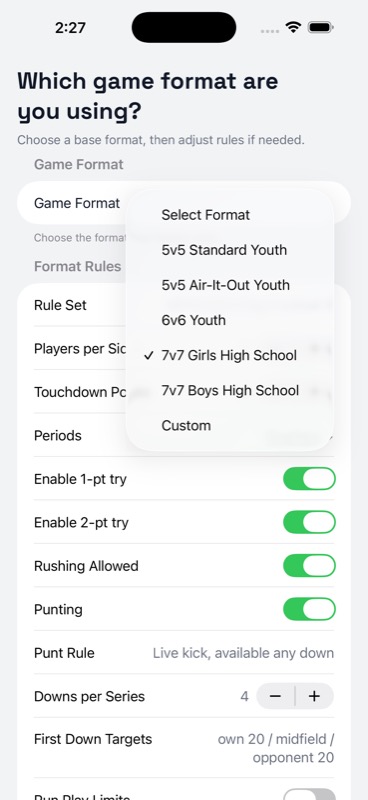
Select 7v7 Girls High School to apply the NFHS baseline. California CIF is a separate selectable overlay, so choose that instead if you play under CIF rather than adjusting the NFHS format.
Rules aware scoring in StatHawk covers quarters, zone to gain targets, tries, punts, equal possession overtime, and scorer confirmed penalty effects. The app records the game state as you enter plays and keeps the down, zone, and score consistent.
What the app does not do: it does not detect exact field position, it does not apply every penalty automatically, and it does not replace the rules book or your state association's guidance. You confirm spots, first downs, and penalty enforcement based on what the officials signal, and StatHawk keeps the rest in order.
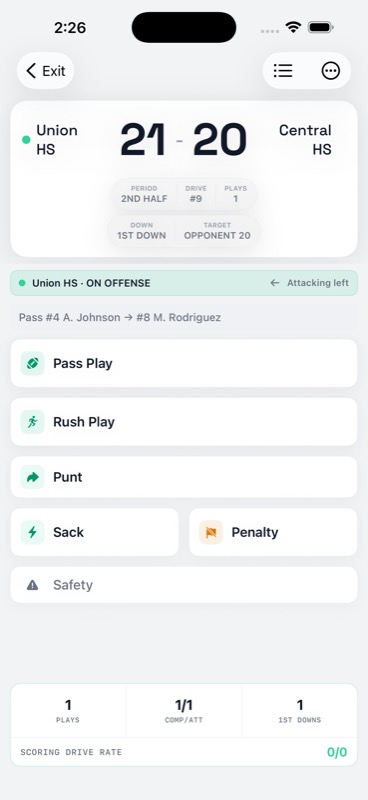
For a full game day walkthrough, read how to track high school flag football stats under NFHS rules.
Track your team with StatHawk
StatHawk is the free iOS app built for flag football coaches. Score games live, build full box scores, and share a live stats link for a personal-team game that parents and fans can open in a browser without an account or app download. Want deeper Insights and the full Insights PDF? See StatHawk Pro. Coaches can download StatHawk free on the App Store.