
How Scoring Works in High School Flag Football (NFHS Rules)
High school flag football runs on NFHS rules, and scoring under those rules works differently from the youth rec formats most coaches learned first. There are three post-touchdown try options, and, depending on your state: a kick extra point, a standalone field goal, and a structured overtime format. If you're new to the high school game, or you're coming from NFL FLAG or USA Flag youth programs, this guide covers exactly what changed and why it matters on the sideline.
The Point Values
Every way to score in NFHS flag football, and what it's worth:
| Scoring Play | Points |
|---|---|
| Touchdown | 6 |
| 1-point try (from the 3-yard line) | 1 |
| 2-point try (from the 10-yard line) | 2 |
| 1-point kick extra point (from the 3-yard line)* | 1 |
| Field goal* | 3 |
| Safety | 2 |
*The kick extra point and field goal are state association adoptions under NFHS rules. The NFHS rulebook defines them but leaves it to each state to approve their use. Check with your state association to confirm whether these are active in your program. StatHawk enables both for NFHS and CIF formats by default.
The scoring summary in StatHawk uses these exact values and shows a running point total for each team throughout the game.
Touchdowns
A touchdown scores 6 points. It can happen on a completed pass caught in the end zone, a rush into the end zone, or a defensive return, an interception or fumble recovery taken all the way back for a score.
After any touchdown, the scoring team gets one post-touchdown attempt. In NFHS and CIF formats, the app immediately presents the try selection screen.
The Three Try Options
This is where NFHS diverges most from youth formats. After a touchdown, the scoring team has three choices, not just two.
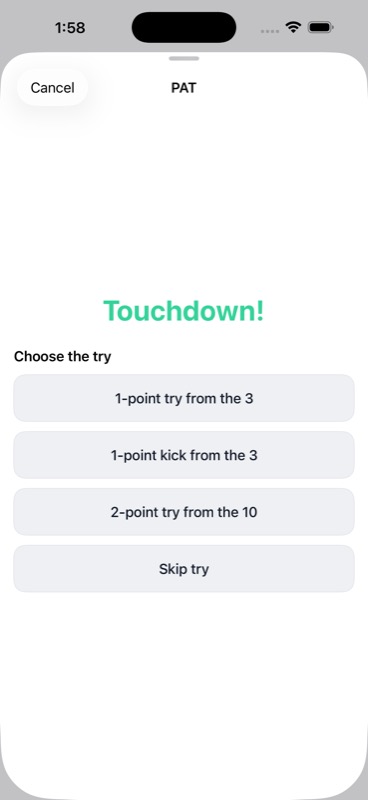
The app shows these in order:
1-point try from the 3, A run or pass play from the 3-yard line. Score and your team gets 1 point. This is the most common choice at the high school level, similar to a standard extra point in youth leagues.
1-point kick from the 3: A kicked extra point, also from the 3-yard line, worth 1 point. This is a state association adoption under NFHS rules, not every state has approved it, so check your state association before using it in a game. StatHawk enables it by default for NFHS and CIF formats.
2-point try from the 10, A run or pass play from the 10-yard line. Score and your team gets 2 points. The longer distance makes it harder, but the reward is double.
The Spot: 3-yard line or Spot: 10-yard line label confirms which attempt is active before the play is run. If you selected the wrong option, tap Change try to swap before committing.
How run and pass tries work in the app
Once you select the 1-point or 2-point try, the app asks how the attempt was made.
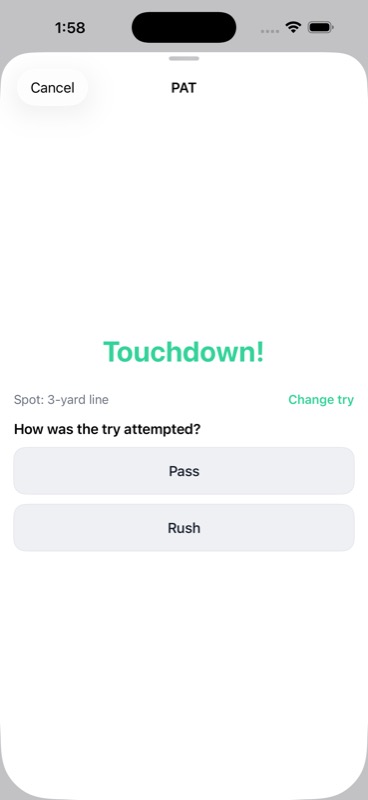
Tap Pass or Rush. Then the result screen appears.
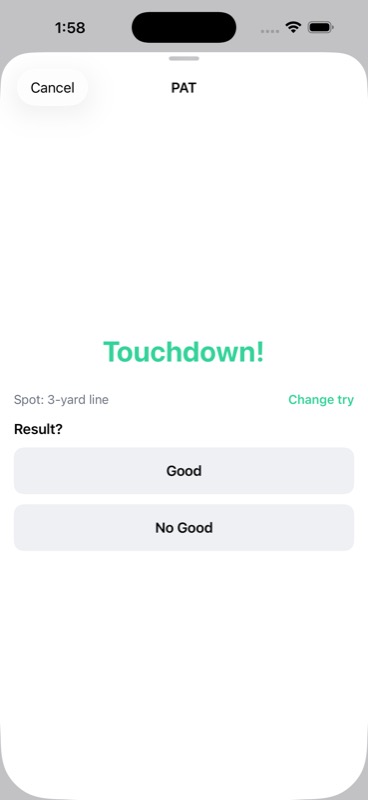
Tap Good if the try was successful, No Good if it wasn't. The score updates automatically. Player attribution is captured here as well: passer, receiver, or rusher depending on the play type.
Kick extra points
The 1-point kick functions the same way as a run or pass try in terms of point value, but the flow in the app differs slightly. After selecting 1-point kick from the 3, the app asks for the kicker, then records the result. Kick stats are tracked separately and included in the game box score and MaxPreps export.
Choosing the right try
For most high school programs, the 1-point try from the 3 is the default. Go for 2 when you're trailing and need to close a gap, or when you have a reliable red-zone play from 10 yards. The kick option tends to appear more often at programs with a specialist or when coaches want to keep the margin clean.
Field Goals
The NFHS rulebook includes field goals as a state association adoption, worth 3 points, attempted as a place kick from scrimmage. Not every state has approved field goals, so confirm with your state association before expecting them in your games.
For states and programs where field goals are active, the attempt appears as a fourth-down option in StatHawk when you're set up under NFHS or CIF rules.
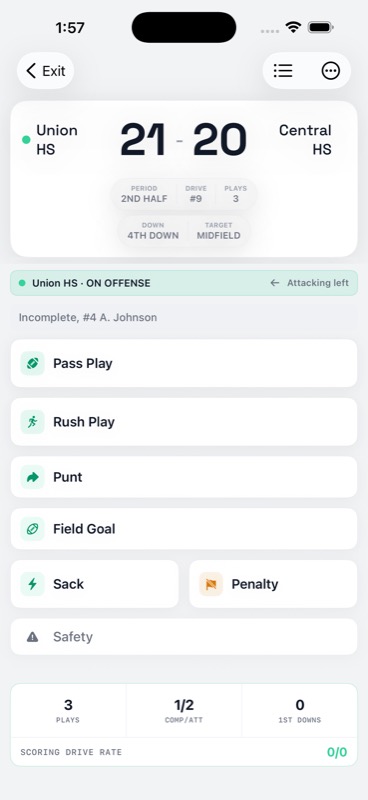
The Field Goal button is available any time it's fourth down during regulation. In overtime, it does not appear, see the overtime section below.
In the app, selecting Field Goal brings up a kicker selection screen, then a result screen with Good and No Good. Distance is not tracked. Kicker attribution and attempt results are recorded in the box score.
A made field goal scores 3 points for the kicking team. A missed field goal turns the ball over at the spot, same as any failed fourth-down attempt.
Safeties
A safety scores 2 points for the defensive team. It happens when the ball carrier is flagged in their own end zone. Under NFHS rules, after a safety the team that gave up the points kicks from their own 20-yard line.
Safeties are uncommon but do happen, most often on a quarterback scramble deep in their own territory or a bad snap that can't be recovered cleanly. StatHawk records the safety and credits the 2 points automatically.
Scoring Summary in the Box Score
After the game, the scoring table in the box score shows each player's scoring contributions, touchdowns, tries, kick extra points, field goals, along with a total points column.
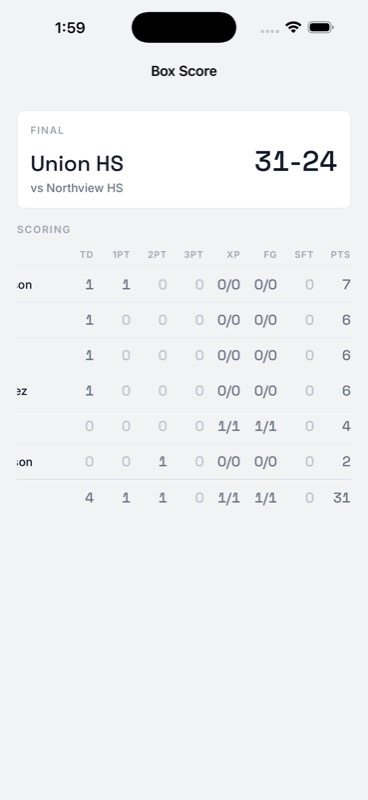
This is useful for quickly reviewing who produced and how, without digging through the full play log.
Overtime
NFHS rules leave overtime to state associations, there is no single mandated OT format. If the score is tied at the end of the fourth quarter, whether and how overtime is played depends on your state association's adopted procedure.
StatHawk implements a structured overtime flow for tied games: each team gets one possession with equal opportunity, ending with an overtime try. The standard regulation play options, including the field goal button, are replaced by OT-specific controls.
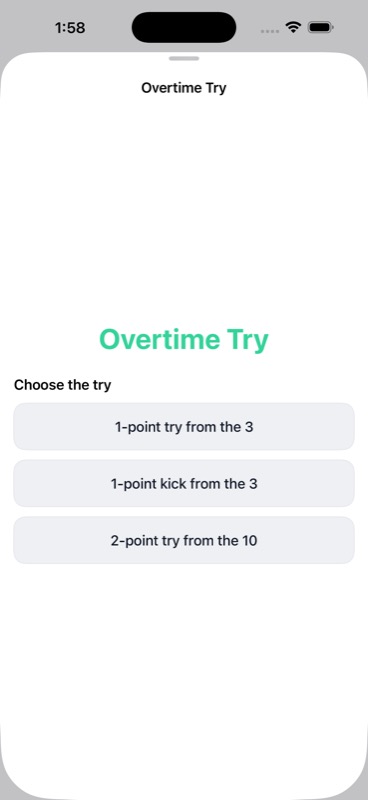
The try options in overtime are the same as in regulation: 1-point from the 3, 1-point kick from the 3, 2-point from the 10. The sheet title changes to Overtime Try to make the context clear. The skip option is not available in overtime.
If the score is still tied after both teams have had their possession, another overtime period begins. The game ends when one team leads after an equal number of overtime possessions.
If your state uses a different OT format, check with your state association. StatHawk's OT flow covers the most common structure, but state-specific variations may differ.
NFHS vs. CIF vs. Youth Formats
If you're coaching a California program under CIF rules, the scoring system in the app matches NFHS. Both formats show all three try options and the kick extra point by default in StatHawk. The differences between NFHS and CIF show up in other areas, punt rules and live ball behavior, not in the core scoring structure.
For coaches in other states, the presence of the kick extra point and field goal in your games depends on whether your state association has adopted those rules. The NFHS rulebook defines both as optional adoptions. StatHawk enables them for NFHS and CIF formats, but if your state hasn't adopted kicking rules, you can simply skip past those options in the app.
Youth formats (NFL Flag, USA Flag 5v5, 6v6) do not include the kick extra point option or field goals regardless. If you're moving from a youth coaching background to a high school program, those are the two biggest scoring adjustments to be aware of.
Tracking All of This in StatHawk
StatHawk is built for NFHS and CIF high school programs. When you set up your team as High School Girls 7v7 or the corresponding boys format, the app defaults to NFHS rules automatically. Every try option, the kick extra point, field goals, quarters, overtime, and line scores are all part of the standard flow.
You don't set up separate scoring rules. You don't enter points manually. You record what happened on each play, and the app handles the rest.
Download StatHawk free on the App Store and set up your first high school team. The game schedule, roster, and first tracked play take about five minutes.
Track your team with StatHawk
StatHawk is the free iOS app built for flag football coaches. Score games live, build full box scores, and share a live stats link for a personal-team game that parents and fans can open in a browser without an account or app download. Want deeper Insights and the full Insights PDF? See StatHawk Pro. Coaches can download StatHawk free on the App Store.