
How to Track High School Flag Football Stats (NFHS Format Guide)
The practical workflow is straightforward: confirm the rules your program uses, select the supported format, choose a scoring mode, score the game, then review and export the results. The order matters. Your state association's requirements determine how the game is played, while StatHawk records the settings and events it supports.
Use the official NFHS flag football rules page for the national baseline. Then check the current guidance from your controlling state association for local adoptions or modifications before setting up the season.
Confirm the rules before setup
The 7v7 Girls High School format applies StatHawk's NFHS baseline for high school girls flag football. That baseline supports high school game structure such as periods, zone-to-gain progression, tries, punts, penalty effects, and overtime in supported configurations.
California programs playing under CIF rules should select the separate California CIF overlay. Do not treat the NFHS baseline and CIF overlay as interchangeable. They can differ in how supported game situations are handled.
Custom format settings can adjust supported options, but a configurable setting does not prove that StatHawk covers every local requirement. Your association determines the rules. StatHawk provides settings and scoring flows for the behavior it supports.
Before the first game:
- Read your association's current rules and modifications.
- Select 7v7 Girls High School, California CIF, or another supported format that matches the program.
- Review the available settings against the association's requirements.
- Ask the association or assigned officials about any requirement that is not clear in the setup.
For the rules themselves, use the NFHS flag football rules guide for high school coaches.
Choose Classic Mode or Yardage Mode
Classic Mode records the play result and the players involved without requiring offensive yardage on each supported play.
Yardage Mode adds passing, rushing, and receiving yards. The scorer enters that yardage as part of the supported play flow.
Both modes build the score, box score, and player and team statistics from the plays recorded. Yardage Mode does not detect an exact field position, decide that a zone was reached, or award a first down automatically. The scorer confirms spots and first-down decisions from the officials' signals.
Score the game from the officials' decisions
The scorer records what happened on the field and confirms decisions that the app cannot make. That includes spots, first downs, penalty enforcement, and which association-approved options apply.
| Scoring situation | What the scorer records or confirms | Result in StatHawk |
|---|---|---|
| Zones and first downs | Confirm the spot and whether the offense reached the zone to gain. | The tracker keeps the down, zone target, drive context, and play record based on the scorer's entry. |
| Tries and kicking | Under the selected ruleset and association rules, choose an available try or kick option, record the result, and add player attribution when supported. | The score and supported player scoring totals update from the recorded attempt. |
| Punts | When punts apply under the selected ruleset and association rules, record the punt, result, and supported player attribution. | The play log and supported game-level special-teams statistics reflect the recorded punt. |
| Penalties | Record the ruling and confirm the enforcement effect announced by the officials, such as replaying the down or awarding a first down. | The play record and game state reflect the scorer-confirmed enforcement. StatHawk does not decide the ruling. |
| Periods | Use the period structure in the selected format and confirm transitions as the game advances. | Supported period context contributes to the game record and line score. |
| Overtime | Use a supported overtime flow only when it matches the selected ruleset and the association's procedure. Confirm each possession and result. | Supported overtime periods and scoring are included in the final game record. |
Kicking, try, punt, and overtime choices vary by ruleset and association. An option appearing in StatHawk does not establish that your association permits it.
Follow the live game state
The tracker keeps the current period, drive, down, and zone target visible while you score the game.
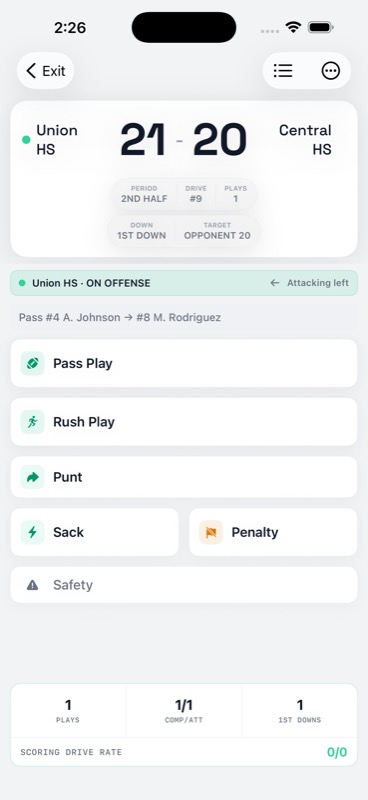
Recorded plays build the score and play log. Review the officials' signal before confirming a first down, penalty effect, try result, or other ruling. StatHawk organizes the entries you make. It does not replace the officials, the rules book, or association guidance.
If the scoring device loses service during an active game, the coach can keep scoring that game on the device. Pending plays sync when the connection returns. Signing in, creating a game, and starting a new game require a connection.
Review the box score and game record
After finalizing the game, review the box score against the play record. Check the final score, player attribution, and the supported stat sections created from the plays you recorded.
The game box score can include passing, rushing, receiving, defense, special teams, and player scoring when those categories have recorded data. Offensive yardage appears when it was entered in Yardage Mode. A period line score is available when the selected format and recorded period context support it.
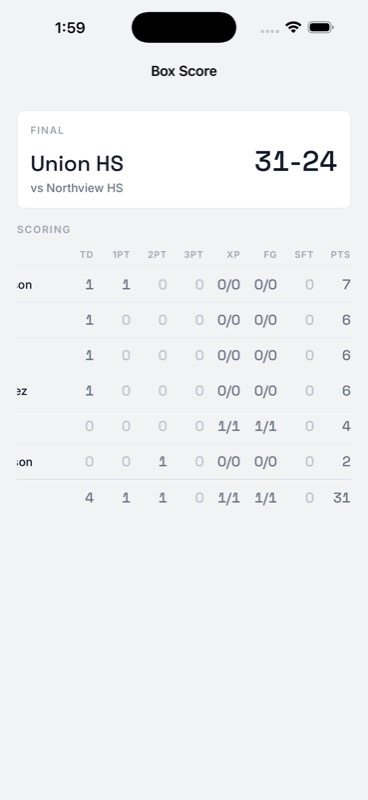
The scoring table summarizes player totals. Use the play record when you need the sequence of events.
Completed games remain available for review and contribute to the team's season record. Core game and season statistics, player game logs, and standard game, player, and team-season PDF reports are available without Pro. A completed game's full play-by-play CSV is also free. See the free flag football stat tracker guide for the full Free and Pro distinction.
StatHawk is currently available on iPhone and iPad.
Export an eligible game to MaxPreps
For an eligible finalized high school game, StatHawk can export a MaxPreps-ready player-stat file. The coach saves or shares the file, then imports it through MaxPreps Team Admin.
This is not an automatic sync, API connection, or push. The file does not set the final score or game result in MaxPreps. The coach enters or verifies that result in MaxPreps separately.
Follow How to Export Flag Football Stats to MaxPreps for eligibility, review, export, and Team Admin import steps.
Before game day
- Confirm the controlling association's current rules and modifications.
- Select the supported high school format or CIF overlay that applies.
- Choose Classic Mode or Yardage Mode.
- Review the roster and decide who will score the game.
- Sign in and start the game while connected.
- After the game, verify the box score before exporting reports or an eligible MaxPreps file.
Track your team with StatHawk
StatHawk is the free iOS app built for flag football coaches. Score games live, build full box scores, and share a live stats link for a personal-team game that parents and fans can open in a browser without an account or app download. Want deeper Insights and the full Insights PDF? See StatHawk Pro. Coaches can download StatHawk free on the App Store.